
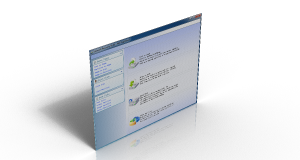
Clone, Backup, or Migrate Your Disk Safely — Now Stronger in Version 5.3
Lazesoft Disk Image & Clone
Upgrade HDD to SSD, clone Windows system disks, and create reliable backup images with advanced disk cloning technology.

Free Usage Policy
| Edition | Free Usage |
| Home Edition | Completely Free for personal use |
| Professional Edition | Free when disk capacity is less than 1 TB |
Home users can upgrade or migrate disks safely without hidden restrictions.
Clone your entire hard disk, backup or restore your hard disk on online or offline easy and safely.
Lazesoft Disk Image & Clone may be used for backups, hard disk upgrades or disk duplication purposes.
Your hard disk is full, you need to upgrade to a new hard disk? You think you are facing a large re-installation project which is likely to take several days of tedious work.
With Lazesoft Disk Image & Clone, Clone/copy entire disk including Windows, programs, files and personal settings to a new disk/partition in several clicks. Never need to reinstall Windows and programs.
Need to backup your System safely?
With Lazesoft Disk Image & Clone, your can backup your entire system or disk to image files safely on offline, or clone your entire disk to another for backup.
Options to set screen resolution in the boot disk
Add Network Interface Card Drivers in the boot disk
Note: Lazesoft Disk Image & Clone is included in Lazesoft Recovery Suite, an all-in-one toolkit for data recovery, disk cloning, system backup, and Windows repair.
What's New in Version 5.3
- Faster BitLocker Volume Backup: Faster backup of unlocked BitLocker volumes with smaller backup image files.
- Create a Portable Windows 11 USB Drive: Create a portable Windows 11 installation on an external USB hard drive.
- Enhanced USB Boot Hard Disk Builder: Create a bootable USB hard disk with a separate data partition for backup images and other files.
- Enhanced WinPE Boot Disk Builder: Improved Windows 11 compatibility when creating bootable recovery media.

Disk Clone & System Migration
- Clone an old hard disk drive to a new large one.
- copy system partition to a new SSD drive.
- Easy to use wizard-driven interface.
- Partitions can be copy either with original sizes and locations, or Resizes transferred partitions to match new hard disk size.
- Clone with fast mode (Only copy used blocks) or complete mode (sector by sector copy).
- Support any types of hard disks like SATA, IDE, SSD, SAS, RAID, USB.
- Support FAT, FAT32, NTFS file systems.
- Includes special sector-by-sector support for other partitions and corrupted file systems.
- When partitions are copied an original hard disk remains unchanged.
Supports Modern Large Storage Devices
- Supports modern disks larger than 16TB
- Works with GPT and MBR partition styles
- Compatible with SATA, NVMe, SSD, RAID and USB drives
- Supports UEFI and legacy BIOS systems
Common Disk Upgrade Scenarios
- Clone HDD to SSD without reinstalling Windows
- Migrate Windows to a larger hard disk
- Clone system disk before upgrading storage
- Create a full disk backup image before risky operations
- Duplicate a disk for deployment or maintenance
- Backup entire system before installing Windows updates
System Backup and Disk Imaging
Back up and restore your entire Windows system with ease using our powerful disk imaging technology. Protect your OS, applications, and data from unexpected loss with flexible, secure, and efficient features.
Key Features
- Flexible Scheduling – Run backups daily, weekly, at startup, or on demand.
- Backup Schemes – Full, Incremental, or Differential backups with automatic cleanup.
- Smart Partition Detection – Automatically detects and selects boot, EFI, MSR, and recovery partitions.
- Advanced Options – Password protection, compression, sector-by-sector copy, and file exclusion.
- Built-in Tools – Browse, validate, and manage backup tasks from one place.
Backup Capabilities
- Create Backup Disk Image – Back up only occupied clusters for efficiency.
- Create Raw Disk Image – Perform a sector-by-sector copy for exact replication.
- Image Compression – Reduce backup file size to save storage space.
- Incremental Backup Support – Save time and space by backing up only changed data.
- Encryption Options – Secure backups with password protection and multiple encryption modes.
- Command-Line Interface – Paid versions only; automate backups via CLI commands.
- File System Support – Works with FAT16, FAT32, and NTFS file systems.
- Corrupted/Unsupported Partitions – Back up via sector-by-sector mode.
- FAT32 Compatibility – Automatically split backup files into 4GB chunks when needed.
Partition Management
- Creates FAT, FAT32, NTFS partitions.
- deletes any types of partitions.
- Format FAT, FAT32, NTFS partitions.
- Hide/unhide partition.
- Set active partition.
Wipe Disk or Partition
- Securely wipe entire disk.
- Wipe multiple partitions even if system partition.
- Has quick mode and deep mode.
- Wipe any types of partitions.
- Support GPT, MBR and Dynamic volumes.
Repair Tools
- Backup/Restore/Rebuild MBR
- Backup/Restore/Rebuild MBR boot sector
- Rebuild Boot Menu
- Lost Partition Recovery
- Added Lazesoft BCD Doctor
VHD Management
- Create VHD
- Attach VHD
- Detach VHD
- Install Windows 7/8/10/11 on VHD
- Install Windows 8/8.1/10/11 on USB disk
Top Frequently Asked Questions
How to burn a bootable recovery CD
How to boot from the created recovery CD
How to create a bootable recovery USB Disk and boot from it
What are the requirements to create a bootable CD of the software?
Since, this disk clone and backup software runs only from a bootable CD, you need to create a boot disk for using the system. For this purpose, you require the following resources:
- * A working Windows computer on which you can download bootable image of the software.
- * A CD drive to burn the software image on CD.
- * A recordable CD.
What version of Microsoft Windows is supported by Lazesoft Disk Image & Clone?
The software supports:
- * Fully supports Windows 11, 10, 8.1, 7
- * Fully supports Windows 2022, 2019, 2016, 2012 R2, 2012, 2008 R2, 2008, 2003 servers
Which Version Should I Choose?
There are four editions of Lazesoft Disk Image & Clone - Home Edition, Professional Edition, Server Edition, Unlimited Edition. Here come the differences or limitations among them.
| Features | Home Edition | Professional Edition | Server Edition | Unlimited Edition |
| Supports Windows 11 / 10 / 8.1 / 7 |  |
|
|
|
| Supports Windows Server 2022 / 2019 / 2016 / 2012 R2 / 2012 / 2008 / 2008 R2 | - | - | |
|
| Bootable Recovery CD, USB Disk | |
|
|
|
| Clone/Copy Disk. | |
|
|
|
| Clone/Copy Partition. | |
|
|
|
| Backup Disk/Partition to Image Files. | |
|
|
|
| Restore Disk/Partition from Image Files. | |
|
|
|
| Only copy used blocks or sector by sector copy.. | |
|
|
|
| Create, Delete Partition | |
|
|
|
| Format Partition | - | - | |
|
| Wipe Partitions or Entire Disk | |
|
|
|
| WinPE Recovery CD Builder | |
|
|
|
| License | Home License | Business License | Business License | Unlimited License & Technician License |
| Price | Free |  US$39.99 US$39.99US$17.95 |
US$79.49 |
US$199.69 US$159.69 |
* Home Licenses - for non-commercial purposes. Single license may be used for up to 3 PCs in one household. The Home license will be assigned to the individual's name.
** Business Licenses - for commercial use. With a Business License the company can use the program in a business, academic, or government environment.
*** Unlimited License - Business license that provides unlimited worldwide licensing for corporation / Government / Educational Institution.
**** Technician License - For Data, System, Password Recovery Service Providers / Repair and Maintenance Companies. Provide technical services to your clients.

Highly Recommended our highest value software -- Lazesoft Recovery Suite
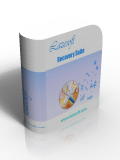
Lazesoft Disk Image & Clone is one component of Lazesoft Recovery Suite. Besides, Lazesoft Recovery Suite also include follows component:
Lazesoft Data Recovery - powerful data recovery software
Lazesoft Windows Recovery - Windows booting problem fixing tool
Lazesoft Recover My Password - Windows password resetting tool
30 Days Money Back Guarantee

Testimonials
"I needed this type of product. It worked. I love it. Thank you."--David Lustig
"That worked. You don't know how much I appreciate your help. I will suggest your program to anyone that ask. Thanks again you're a life saver."--Keith Compton

Awards
Product News
September 2026
Lazesoft Recovery Suite 5.3 Released
Faster BitLocker volume backup
Enhanced One-Click Windows Boot Repair
Improved exFAT data recovery
...


