
Start Menu on Lazesoft boot disk
Lazesoft Recovery Suite boot disk is all-in-one recovery/repair boot disk. It includes a lot of useful recovery/repair tools. These functions are located in the modules, Data Recovery, Password Recovery and Disk Image & Clone. It is not convenient to launch some common used tools, such as Lazesoft File Manager, Command Prompt and run any third-party tools. So, we added a Start Menu to help users to quickly launch the useful tools.
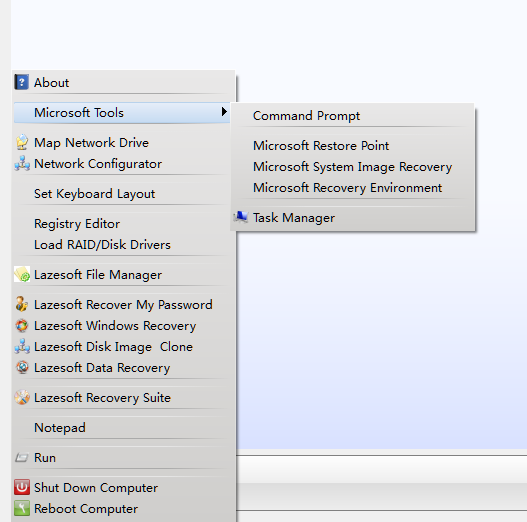
Brief explanations for the useful tools in the Start Menu of Lazesoft boot disk.
Reboot computer
Restart computer
Shut down computer
Power off computer
Run
Launch Microsoft or third-party tools quickly with Lazesoft Run Dialog. You can try to type ‘taskmgr‘ , ‘regedit’, etc, to launch useful tools quickly and directly.
Notepad
Launch Microsoft Notepad to edit or view a text file.
Lazesoft Recovery Suite
Launch Lazesoft all-in-one tool with its home page
Lazesoft Recover My Password
Launch Lazesoft password recovery tool
Lazesoft Windows Recovery
Launch Lazesoft boot repair tool
Lazesoft Disk Image & Clone
Launch Lazesoft disk backup/clone/manager tool
Lazesoft Data Recovery
Launch Lazesoft data recovery tool
Lazesoft File Manager
Launch Lazesoft File Manager to explore /copy/export files/folders when Windows is offline
Load RAID/Disk Drivers
Load RAID controller, ACHI controller drivers when the internal hard disk is not detected.
Registry Editor
Mount the proper Windows offline registry files and launch Microsoft Registry Editor. Registry Editor allows you to edit the offline registry files.
Set Keyboard Layout
Change the Keyboard Layout, if you do not want to use US Keyboard Layout.
Network Configurator
Configure the local network setting to connect to Internet or local network
Map Network Drive
Map a network drive as a local drive, so you can easily backup drive or copy files on it.
Microsoft Tools->Command Prompt
Launch Command Prompt with administrator privilege.
Microsoft Tools->Microsoft Restore Point
Launch Microsoft Restore Point
Microsoft Tools->Microsoft System Image Recovery
Launch Microsoft System Image Recovery
Microsoft Tools->Microsoft Recovery Environment
Launch Microsoft Recovery Environment
Microsoft Tools->Task Manager
Launch Microsoft Task Manager to view/kill the current running applications/services
About
Get information about the current version of Lazesoft boot disk
Lazesoft Recovery Suite is easy to use, powerful boot disk design to Recover Data, Recover crashed Windows System, Recover Windows Password, Clone or Backup Disk, etc.
Free Windows recovery manual
build a Windows 7 USB System Repair Disc
Fix Error 0xc000000f - BCD Missing
Fix a damaged MBR for Windows XP
Fix a Windows XP Loading Crash
Fix 'Operating system not found'
fix Windows Server 2008 BOOTMGR is missing Error
fix the 'Hal.dll is Missing' error
Start Menu on Lazesoft boot disk
Build Windows 7 System Repair Disc
Build Windows 8 recovery USB disk