
Generate Report in Windows Recovery
When Windows won’t boot, the root cause may be more than a simple boot record issue. Use Generate Report to collect safe diagnostics so Lazesoft support can provide precise, step-by-step recovery instructions for your machine.
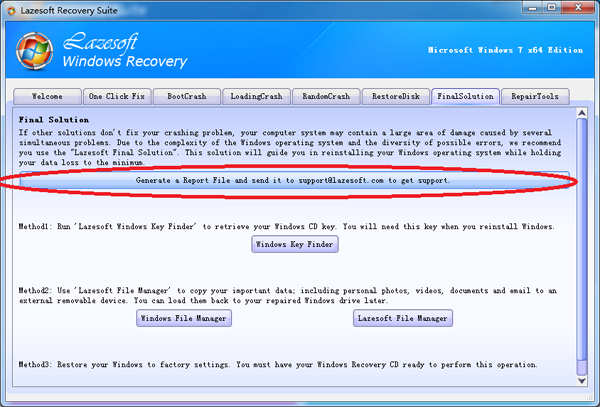
Lazesoft Windows Recovery includes a One-Click Repair feature that fixes many common boot problems automatically. But for complex or uncommon failures (disk layout changes, BCD corruption, driver/storage controller issues, file system damage), deeper analysis is sometimes required. For these cases, Lazesoft provides Generate Report in the Final Solution section.
When should you use Generate Report?
- Windows still cannot boot after One-Click Repair
- A blue screen (BSOD) or reboot loop continues
- A boot menu exists but the system won’t load
- Disk/partition structure looks unusual after cloning or resizing
- You’re unsure which repair action is safe to try next
Instead of guessing and risking additional damage, create a report and let Lazesoft support analyze the exact cause.
What information does the report contain?
The report collects technical diagnostic information only, such as:
- Disk and partition layout
- MBR / GPT boot structure
- BCD configuration
- Detected Windows installations
- File system status and boot-critical file checks
- Storage hardware/controller detection
No personal files are included. The report does not copy documents, photos, or private user data — it only captures system/boot metadata needed for repair guidance.
How to generate the report
- Boot the computer using your Lazesoft Recovery USB or CD
- Open Windows Recovery
- Go to Final Solution
- Click Generate Report
- Save the generated report file
Send the report to Lazesoft support
Email the generated report file to: support@lazesoft.com
Our engineers will review the diagnostics and reply with tailored recovery steps. In many cases, systems that appear unrecoverable can be repaired without reinstalling Windows or losing data.
Why this matters
Random repair attempts can overwrite boot structures or worsen partition damage. Generate Report enables accurate diagnosis before repair, which increases recovery success rate — especially for business PCs, servers, and systems after disk cloning or partition changes.
Lazesoft Recovery Suite is easy to use, powerful boot disk design to Recover Data, Recover crashed Windows System, Recover Windows Password, Clone or Backup Disk, etc.