
How to fix "BOOTMGR Is Missing"
If, when you attempt to boot your computer, you encounter the problem "BOOTMGR is missing", you do not need to worry. You can either use your Windows installation DVD or our free Windows software Lazesoft Windows Recovery Home Edition to solve the problem.
Solution ONE: Use your Windows installation DVD:
- Insert your Windows installation DVD into the CD/DVD drive on your broken computer.
- Select either BIOS or the boot menu to boot from the CD/DVD drive.
3. Choose your local settings such as language, time and keyboard.
4. Click the <Repair your computer> button. Windows will search for your Windows installation volume.
5. Select a Windows installation volume from the list found in your computer.
6. Click the <Startup Repair> button. Windows will check and try to repair the problem. Please wait while Windows is working.
7. A message will be displayed when the repairs are completed.
8. Remove the DVD and reboot your computer. You will find that Windows will start normally.
Solution TWO: Use Lazesoft Windows Recovery or Lazesoft Recovery Suite
If you do not have a Windows installation disc, our free Lazesoft Windows Recovery Home Edition can help you fix the BOOTMGR missing problem easily and quickly.
You can build a bootable CD or USB flash drive, then use it to boot your broken computer. Our Lazesoft Windows Recovery bootabe disk is much more powerful than a standard Windows installation DVD.
The following are the steps you can follow to repair your Windows boot manager:
1. Create a bootable CD/USB drive using our Lazesoft Windows Recovery Home Edition.
2. Reboot your computer from the newly burned Lazesoft Windows Recovery boot disk.
3. Follow the steps you are given to start repair the "BOOTMGR is missing" error.
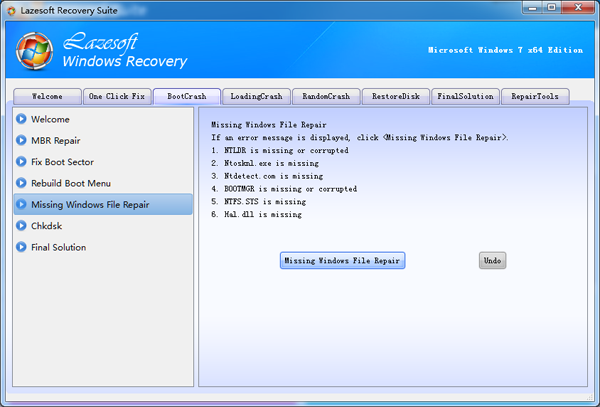
Lazesoft Recovery Suite is easy to use, powerful boot disk design to Recover Data, Recover crashed Windows System, Recover Windows Password, Clone or Backup Disk, etc.
Free Windows recovery manual
build a Windows 7 USB System Repair Disc
Fix Error 0xc000000f - BCD Missing
Fix a damaged MBR for Windows XP
Fix a Windows XP Loading Crash
Fix 'Operating system not found'
fix Windows Server 2008 BOOTMGR is missing Error
fix the 'Hal.dll is Missing' error
Start Menu on Lazesoft boot disk
Build Windows 7 System Repair Disc
Build Windows 8 recovery USB disk