
Free Unformat Mini SD or MicroSD Card
Accidentally formatted a Mini SD or MicroSD card? In many cases, photos, videos, and files can still be recovered if you stop using the card immediately and scan it with reliable data recovery software before the lost data is overwritten.
Important: Do not take new photos, copy new files to the card, format it again, or run disk repair tools before recovery. Save recovered files to your computer or another external drive, never back to the same memory card.
Can a Formatted Mini SD or MicroSD Card Be Recovered?
Yes, recovery is often possible after an accidental format, especially after a quick format. The files may disappear from Windows, your phone, or your camera, but the original photo and video data may still remain on the card until new data overwrites it.
Lazesoft Data Recovery can scan the formatted memory card and help recover common file types such as JPG photos, PNG images, MP4 or MOV videos, documents, and other saved files.
Before You Start
- Stop using the card. Every new photo, video, download, or app write may overwrite recoverable files.
- Remove the card from the phone or camera. This helps prevent the device from writing new data to it.
- Use a card reader. A USB SD/MicroSD card reader usually gives recovery software better access than connecting the phone or camera directly.
- Prepare another storage location. Recover files to your computer hard drive, an external drive, or another USB disk.
- Do not format again. If Windows asks “You need to format the disk before you can use it,” click Cancel.
How to Unformat a Mini SD or MicroSD Card for Free
- Download and install Lazesoft Recovery Suite. Install it on your Windows computer, not on the formatted memory card.
-
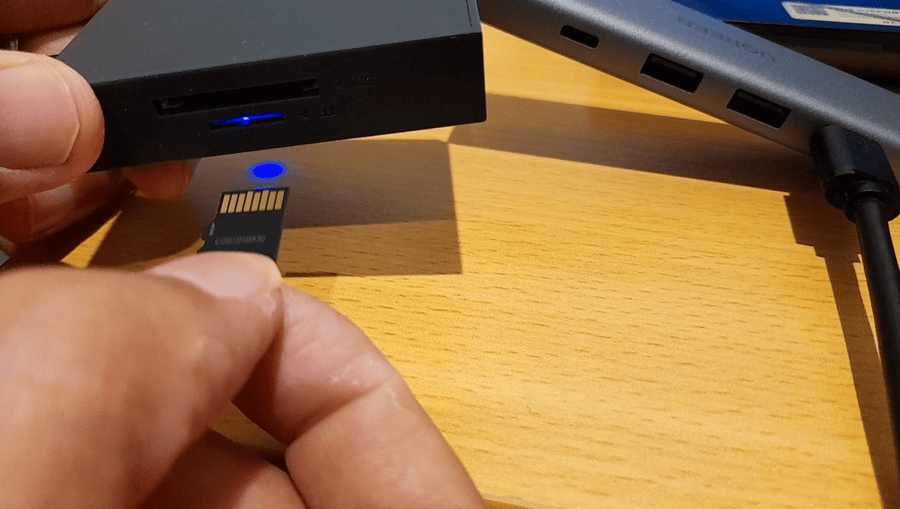
Connect the Mini SD or MicroSD card.
Insert the card into a card reader, then connect the reader to your computer.
If your computer does not have a built-in SD card reader, use a USB card reader to connect the SD card.
-
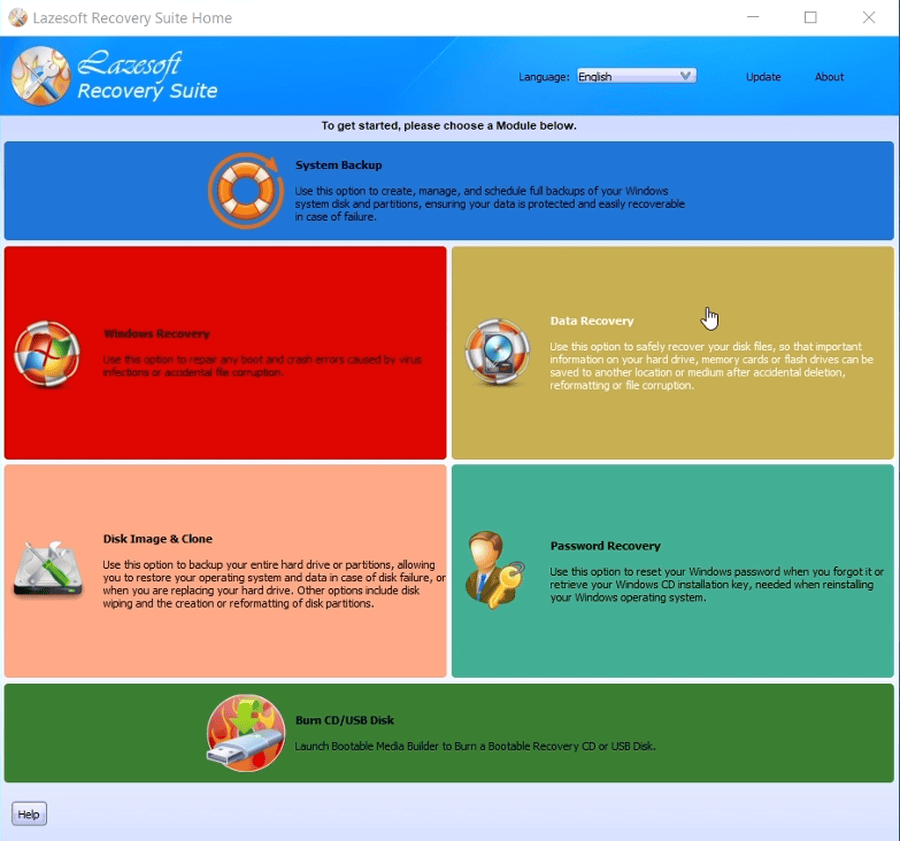
Launch Lazesoft Recovery Suite Home Edition and select Data Recovery.
Open Lazesoft Recovery Suite, then choose the Data Recovery module.
-
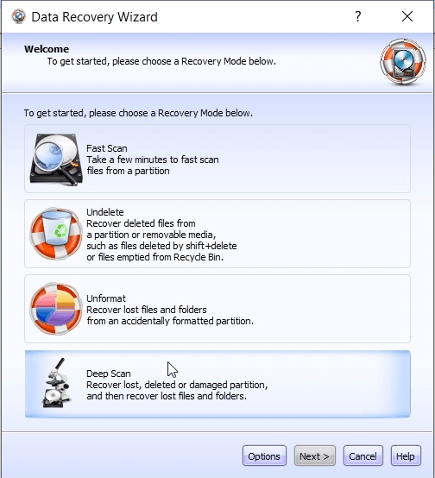
Open Lazesoft Data Recovery.
Choose the "Deep Scan" option for a formatted, damaged, or lost partition. If your card appears as a whole device,
select the whole card instead of only a drive letter.
-
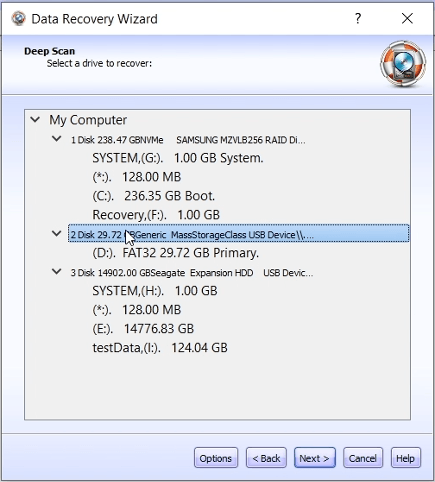
Select the memory card to scan.
Carefully check the size and device name so you do not scan the wrong disk.
-
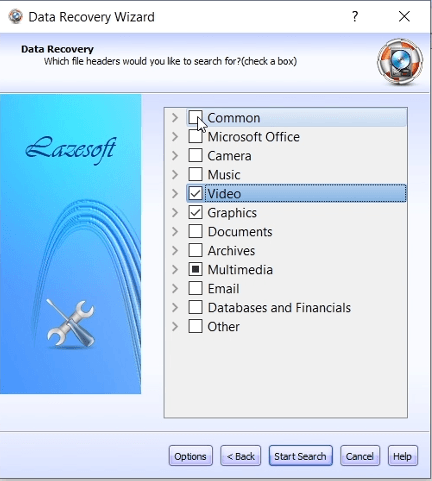
Choose the file types you want to recover.
For a camera or phone card, select photos and videos first. You can also include documents and other file types.
Select Camera, Video, and Graphics file types.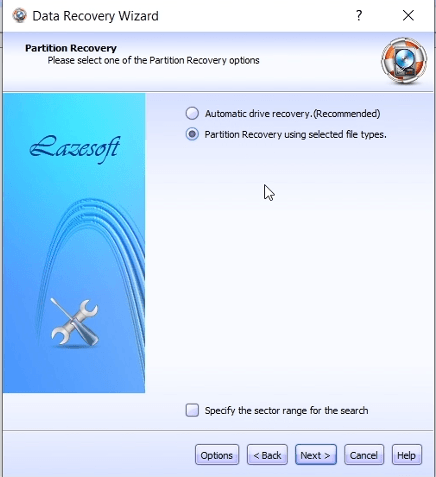
Select the file types you want to recover, such as Camera, Video, and Graphics, then click Start Search.
-
Start the scan and wait for results.
The scan may take longer for large cards or cards with file system errors.
The scan may take some time depending on the card size and condition.
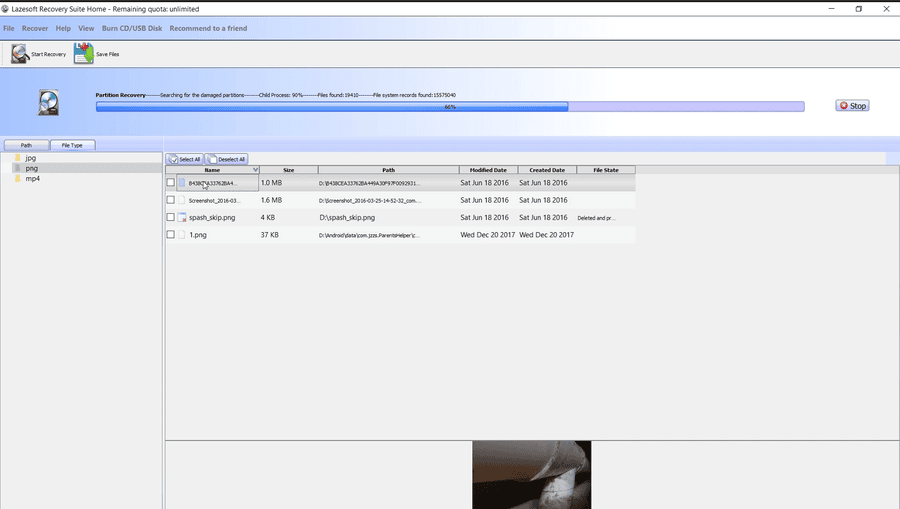
- Preview and select files. Choose the photos, videos, and other files you want to restore.
-
After the scan finishes, select the photos, videos, or other files you need, then click Save. Do not save recovered files back to the same SD card.
Recover to a safe location. Save recovered files to a different drive, not to the same SD card.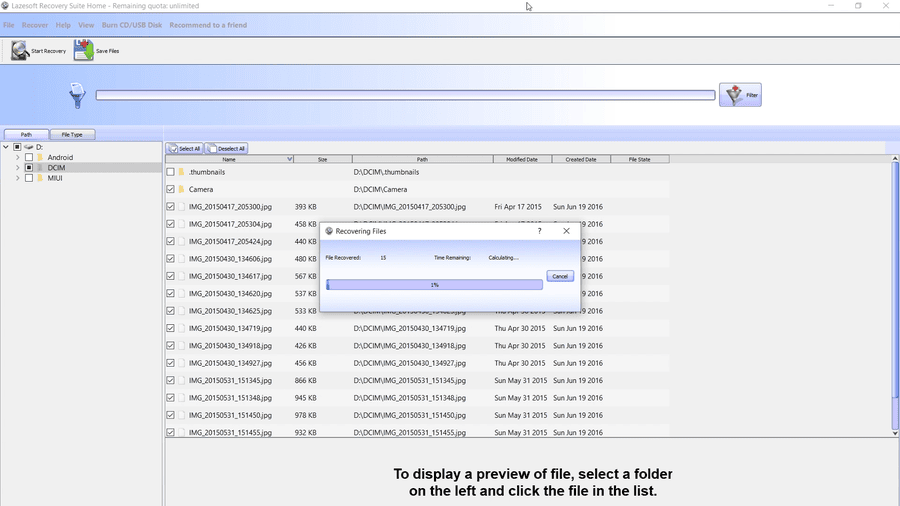
If the Card Does Not Show as a Drive Letter
Some phones and cameras do not expose the memory card as a normal Windows drive. If the card does not appear in “This PC” or “My Computer,” remove the card from the device and use an external SD or MicroSD card reader.
If Windows detects the card but asks you to format it, cancel the format message and run the recovery scan first. If Windows does not detect the card capacity at all, the card reader, adapter, USB port, or the memory card itself may have a hardware problem.
What Files Can Be Recovered?
Depending on the condition of the card, Lazesoft Data Recovery may help recover:
- Photos from phones, cameras, dash cams, drones, and action cameras
- Videos such as MP4, MOV, AVI, 3GP, and camera video files
- Documents, music files, archives, and other saved files
- Files from accidentally formatted, deleted, RAW, or corrupted memory card partitions
When Recovery May Not Be Possible
Data recovery is not guaranteed in every case. Files may be unrecoverable if the card was fully overwritten, physically damaged, repeatedly formatted, or used heavily after the accident. For the best chance of success, stop using the card as soon as you notice the data loss.
Free for Home Users
Lazesoft Recovery Suite is designed to help users recover important files, repair Windows boot problems, reset passwords, and clone or back up disks. Home users can use Lazesoft Recovery Suite for free, and professionals can recover up to 1TB of data for free.
FAQ
Can I recover photos after formatting a MicroSD card?
In many cases, yes. A quick format usually removes file system records but may leave the original data on the card. Recovery should be attempted before writing anything new to the card.
Should I recover files back to the same SD card?
No. Always save recovered files to another drive. Saving files back to the same card may overwrite other lost files that are still recoverable.
Is a card reader required?
It is strongly recommended. A card reader gives the recovery software direct access to the memory card and is usually more reliable than connecting a phone or camera by USB.
What should I do if Windows asks me to format the card?
Click Cancel. Formatting again may reduce the chance of recovery. Run the recovery scan first and save any found files to another drive.
Related Guides
- Basic data recovery steps
- Partition selection - formatted recovery
- Recover data from a formatted or damaged partition
- Recover deleted files
Lazesoft Recovery Suite is easy to use, powerful boot disk design to Recover Data, Recover crashed Windows System, Recover Windows Password, Clone or Backup Disk, etc.