
How to find your Windows Product CD Key
"Do you need to reinstall Windows, but have lost your Windows product key?"
You can follow this tutorial to learn how to recover Windows Product CD Key.
How to find your Windows Product CD Key
Download Lazesoft Recover My Password and run the software to burn a recovery CD.
Boot your computer from the prepared recovery CD, then Lazesoft Recover My Password will run automatically.
Select <Find Windows Product Key> on the welcome page.
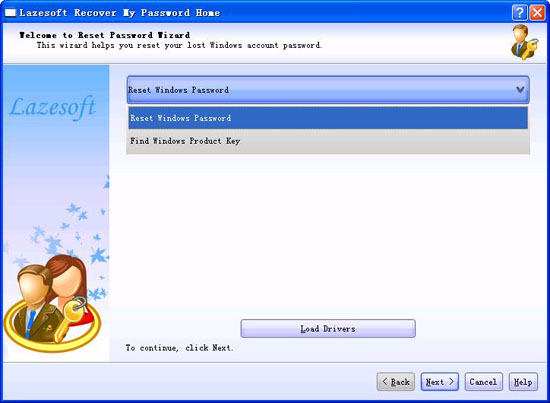
After selecting, click <Next>.
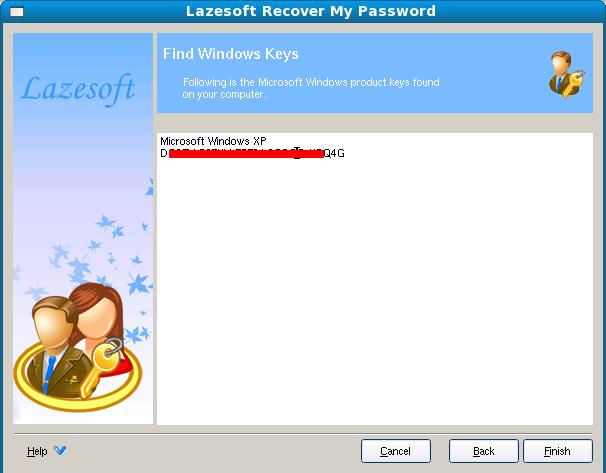
Now, write the found Windows CD key on a paper.
Lazesoft Recovery Suite is easy to use, powerful boot disk design to Recover Data, Recover crashed Windows System, Recover Windows Password, Clone or Backup Disk, etc.
Recovery manual and guides
How to burn a bootable recovery CD
How to boot from the created recovery CD
How to create a bootable recovery USB Disk and boot from it
How to perform a data recovery
How to recover data from formatted or damaged partition
How to fix boot problems if Windows won't start correctly
How to clone entire disk for backup or upgrading
How to recover Windows login password
How to recover Windows Server password
Forgot Windows admin user password
Forgot Windows Server 2003 2008 Domain Administrator Password
How to burn a Windows password recovery CD
How to boot Windows password recovery CD
How to recover Windows login password
How to recover administrator password
How to recover Windows Server password
How to recover Windows XP password
How to recover Windows Vista password
More...