
Lazesoft PE Driver Exporter – Extended User Guide
with Media Builder Integration
Overview
Lazesoft PE Driver Exporter is a utility used to scan and export third-party drivers from the current Windows system. It integrates directly into Lazesoft Media Builder through the "Detect drivers" button, making it easier to collect necessary drivers when creating bootable recovery media.
🔄 Integration with Lazesoft Media Builder
Where to Find It
In the Lazesoft Recovery Suite Media Builder wizard:
- On the welcome screen, you will see the button: 🔍 Detect drivers
What It Does
- Launches the Lazesoft PE Driver Exporter tool.
- Automatically scans for all third-party drivers installed on your Windows system.
- Allows you to select and export relevant drivers.
- Returns the exported drivers to Lazesoft Media Builder for inclusion in the bootable disk.
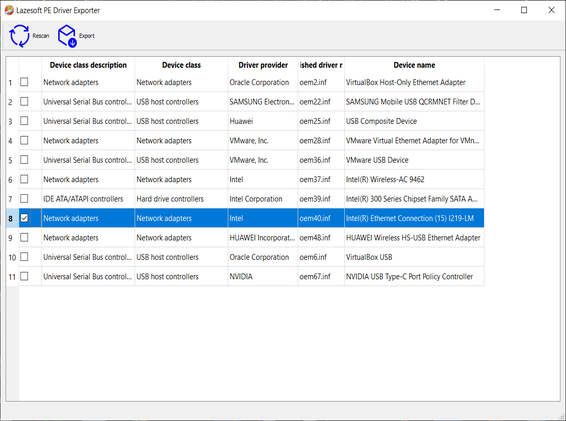
🧰 Full Workflow: Exporting and Using Drivers
Step 1: Launch Media Builder
- Open Lazesoft Recovery Suite Media Builder.
- On the Welcome screen, click Detect drivers.
Step 2: Select Drivers to Export
- The PE Driver Exporter will appear.
- It lists all third-party drivers (e.g., network, USB, RAID).
- Tick the checkboxes for the drivers you want to include in the boot disk.
- Or leave all checkboxes empty to export all drivers.
Step 3: Export Drivers
- Click Export and choose a folder.
- Wait for the exporter to finish saving the selected driver packages.
Step 4: Return to Media Builder
- After exporting, close the PE Driver Exporter.
- Lazesoft Media Builder will now use the exported drivers when building your bootable media.
📌 Why This Matters
Including the correct drivers (especially for):
- Network adapters
- USB host controllers
- RAID/storage controllers
This ensures that your bootable recovery media:
- Can recognize your drives and storage.
- Has network access (for backup, restore, or updates).
- Works with newer or uncommon hardware.
💡 Quick Tips
- Run Media Builder as administrator to ensure full access to driver info.
- Always check for network and RAID drivers when building media for modern PCs or servers.
- Exported driver folders can be reused across different boot media builds.
Lazesoft Recovery Suite is easy to use, powerful boot disk design to Recover Data, Recover crashed Windows System, Recover Windows Password, Clone or Backup Disk, etc.
Recovery manual and guides
How to burn a bootable recovery CD
How to boot from the created recovery CD
How to create a bootable recovery USB Disk and boot from it
How to perform a data recovery
How to recover data from formatted or damaged partition
How to fix boot problems if Windows won't start correctly
How to clone entire disk for backup or upgrading
How to recover Windows login password
How to recover Windows Server password
Forgot Windows admin user password
Forgot Windows Server 2003 2008 Domain Administrator Password
How to burn a Windows password recovery CD
How to boot Windows password recovery CD
How to recover Windows login password
How to recover administrator password
How to recover Windows Server password
How to recover Windows XP password
How to recover Windows Vista password
More...