
Advanced Backup Options
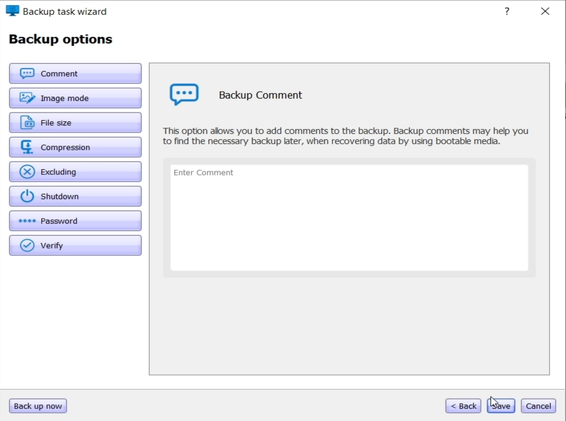
[Optional Step] On the Backup Options page, you can configure various settings for the backup process.
Comment
Click the Comment button to enter a description for this backup version. Including comments helps identify the correct version during data recovery.
Image Mode
You can create an exact copy of the entire partition or disk—not just used sectors.
- This is useful when backing up unsupported operating systems.
- Sector-by-sector mode increases processing time and image size.
- Default: "Used Sector Backup" (recommended).
- To enable full disk copy, check "Sector-by-sector Backup".
Password Protection
By default, backups are not password protected. You can enable protection as follows:
- Enter a strong password (8+ characters, including upper/lowercase letters and numbers).
- Re-enter the password for confirmation.
- Note: Passwords cannot be recovered.
[Optional Step] For added security, choose an encryption method:
- AES-128 — Recommended for most users.
- None — Use password protection only without encryption.
Excluding Items from Backup
You can choose to exclude certain files such as:
- pagefile.sys (Windows Page File)
- hiberfil.sys (Hibernation File)
Reasons to exclude these files:
- Large in size but don’t contain user data
- Volatile and recreated at startup
- Not useful for recovery
- Can slow down the backup
- May cause consistency or access issues
File Size – Backup Splitting
Note: Splitting must be set at creation time.
Default: Automatic
- Hard Drives:
- If supported, a single image file is created.
- If the file system limits size (e.g., FAT32), it splits into 4GB files.
- If space is insufficient, you will be warned.
- CD/DVD/Blu-ray:
- Select file size from the dropdown.
- Useful for later burning from hard disk.
- Note: Direct disc writing may be slower.
Compression
Reduces image size but may slow down the process. Choose one:
- Medium (Recommended) — Balanced speed and size
- None — Faster, but larger files
- High — Smaller files, but slower
Important Notes:
- Highly compressed files like .jpg or .zip won't compress further.
- Compression settings must be chosen when creating the backup.
Shut Down Computer
Enable this to shut down your PC after the backup completes. Useful for long backups or scheduled tasks.
For example, schedule a backup every weekday evening and let the system shut down automatically when done.
Backup Verification Options
Enable automatic verification after backup completion to ensure data integrity. This is recommended for important files and system backups.
Choose an Action:
- To run the backup immediately, click "Back Up Now".
- To run the backup later or on a schedule, click "Save".